
How to Move Your Xaman Wallet to Another App
 Katz5 Min | ,
Your XRP are not inside Xaman. They sit on the XRP Ledger, and the app only holds the key to your wallet. To move, you open the same wallet in another app with that key. Nothing is sent, there’s no fee, and the address stays the same.
What you need is the secret you wrote down when you created the wallet. Xaman shows it only once and can’t show or export it later. No secret? There’s another way, further down.
Find your secret
Look for your paper backup. The secret comes in one of three forms, and the new app has to accept yours.
| What’s on your paper | What it’s called |
|---|---|
| 8 rows of 6 digits, rows A to H | Secret numbers (Xaman’s own format) |
| 29 characters starting with “s” | Family seed |
| 12, 16 or 24 words | Mnemonic |
Most wallets created in Xaman have secret numbers, and not every app can read them. Check this before you start.
Open the wallet in the new app
- Install the app from the App Store or Google Play. Check the developer name: fake wallet apps exist to steal secrets. Links to Katz Wallet in both stores are on our download page.
- Choose to import a wallet and pick the form of your secret.
- Type the secret in. Only into the app on your phone, never into a website or a chat with “support”.
- Compare the address. The app shows an address starting with “r”. It must match your address in Xaman character for character.
If the address is different, you opened some other wallet, usually because of a typo in the secret. Don’t send anything to it. Remove it from the app and type the secret again.
Important: When the addresses match, you see the same balance and the same tokens. Your XRP reserve stays where it was: moving doesn’t free it or lock more.
Keep Xaman or remove it
You don’t have to choose. One wallet can live in two apps at the same time, and a payment signed in one shows up in the other. Keep Xaman while you get used to the new app.
Just remember that the key is now on two apps. Lock both with a passcode. If you stop using Xaman, remove the wallet from it, but only after the new app shows the right address and your paper backup is safe.
If you lost the secret
While the wallet still opens in Xaman, you can move your money to a new wallet. Xaman gives the same advice. This time you do send, and there’s a real transaction.
- Create a new wallet in the new app and write its secret on paper.
- From Xaman, send at least 1 XRP to the new address. That activates it.
- Add each of your tokens in the new wallet first, then send them over one by one.
- Send the rest of your XRP last, minus the reserve the old wallet must keep.
The new wallet itself locks 1 XRP, and each token on it another 0.2 XRP. Why, and how to get it back, is in our guide to the XRP reserve. Xaman shows its own fee before you sign, if there is one.
The same route works for a wallet on a Xaman card (Tangem). Its key lives on the card and can’t be typed into another app.
Which app to move to
Check three things: the app works with the XRP Ledger, accepts your form of secret, and keeps the key on your phone. Katz Wallet takes secret numbers, a family seed and a mnemonic. We compared Xaman, Joey, GemWallet, Crossmark and Katz Wallet in a separate review.
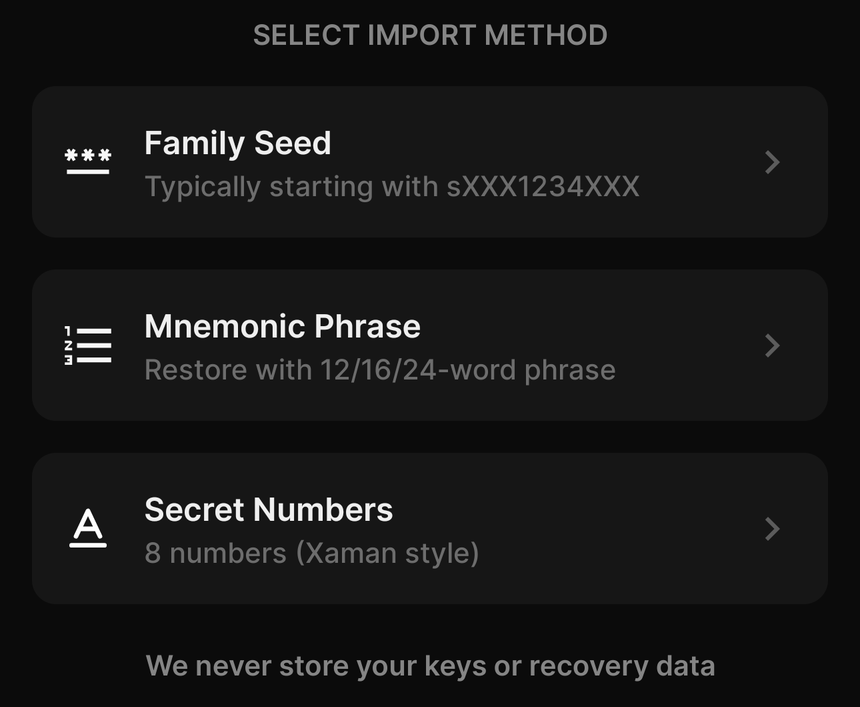
Import in Katz Wallet: pick the form of your secret. Secret numbers are the Xaman option.
Move your Xaman wallet to Katz Wallet
Import it with your secret numbers and you’ll see the same balance and tokens, plus what large XRPL wallets are doing right now. You pay only the network fee: Katz Wallet adds nothing on top. Xaman keeps working as before.